MathVista: Visual Math Problem-Solving
Tests AI models on math problems that involve interpreting visual elements like diagrams and charts, requiring detailed visual comprehension and logical reasoning.
Overview
MathVista to evaluate model performance in answering mathematics problems that have a visual component. Each problem has an associated image which is required to solve the problem. The dataset is made up of 6,141 questions from 28 existing multimodal datasets as well as 3 new datasets created for MathVista, where each dataset contains different styles of questions. There are both multiple-choice questions and free-form questions, where the free-form questions ask for a response in the form of an integer, floating-point number, or list.
Usage
Installation
Install with pip install inspect-evals, or uv sync from a checkout of this repository.
Running evaluations
uv run inspect eval inspect_evals/mathvista --model openai/gpt-5-nanoYou can also import tasks as normal Python objects and run them from python:
from inspect_ai import eval
from inspect_evals.mathvista import mathvista
eval(mathvista)
Drop uv run if you manage dependencies yourself. Log viewing (inspect view) and default-model setup are documented in the Inspect Evals README.
Options
You can control a variety of options from the command line. For example:
uv run inspect eval inspect_evals/mathvista --limit 10 --sample-shuffle
uv run inspect eval inspect_evals/mathvista --max-connections 10
uv run inspect eval inspect_evals/mathvista --temperature 0.5
See uv run inspect eval --help for all available options.
Parameters
mathvista
shuffle(bool): (default:True)
Dataset
Here is an example from the dataset:
**Question:** The derivative of f(x) at x=2 is ____ that at x=5
**Choices:** "larger than", "equal to", "smaller than"
**Image:**
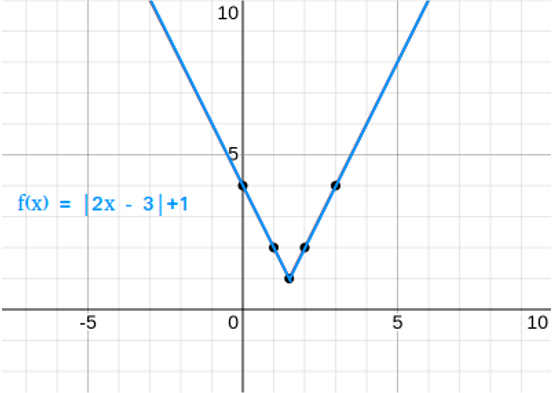
**Correct answer:** "equal to"Scoring
An accuracy is calculated over the datapoints.
Changelog
[2-A] - 2026-02-16
- Migrate version to new scheme. See #907.
[1.0.1] - 2025-12-18
- Adds backoff policy for functions that connect to huggingface servers.
Static checks
Results of inspect-evals-lint at the commit this documentation was built from. Rule names link to their documentation; findings link to the file at that commit. These checks describe structure and conventions, not whether the evaluation measures what it claims.
Loading lint results…