Inspect Evals Register (Beta) User Guide
The Inspect Evals Register aims to make it easier to submit, discover, and run evals that live in their authors’ own repositories. It lists each eval in the inspect_evals docs with a pointer to a pinned commit of the upstream repo.
This guide outlines how to register (and update) evaluations in the Inspect Evals docs. For background on why the project moved to a register model, see About the Register.
Contents
How to run externally-managed evals
Users run registered evals by cloning the upstream repository at the pinned commit, installing its dependencies, and running inspect eval against the task file. Our doc auto-generation creates a usage section that walks through these steps for each registered eval. See below as an example:
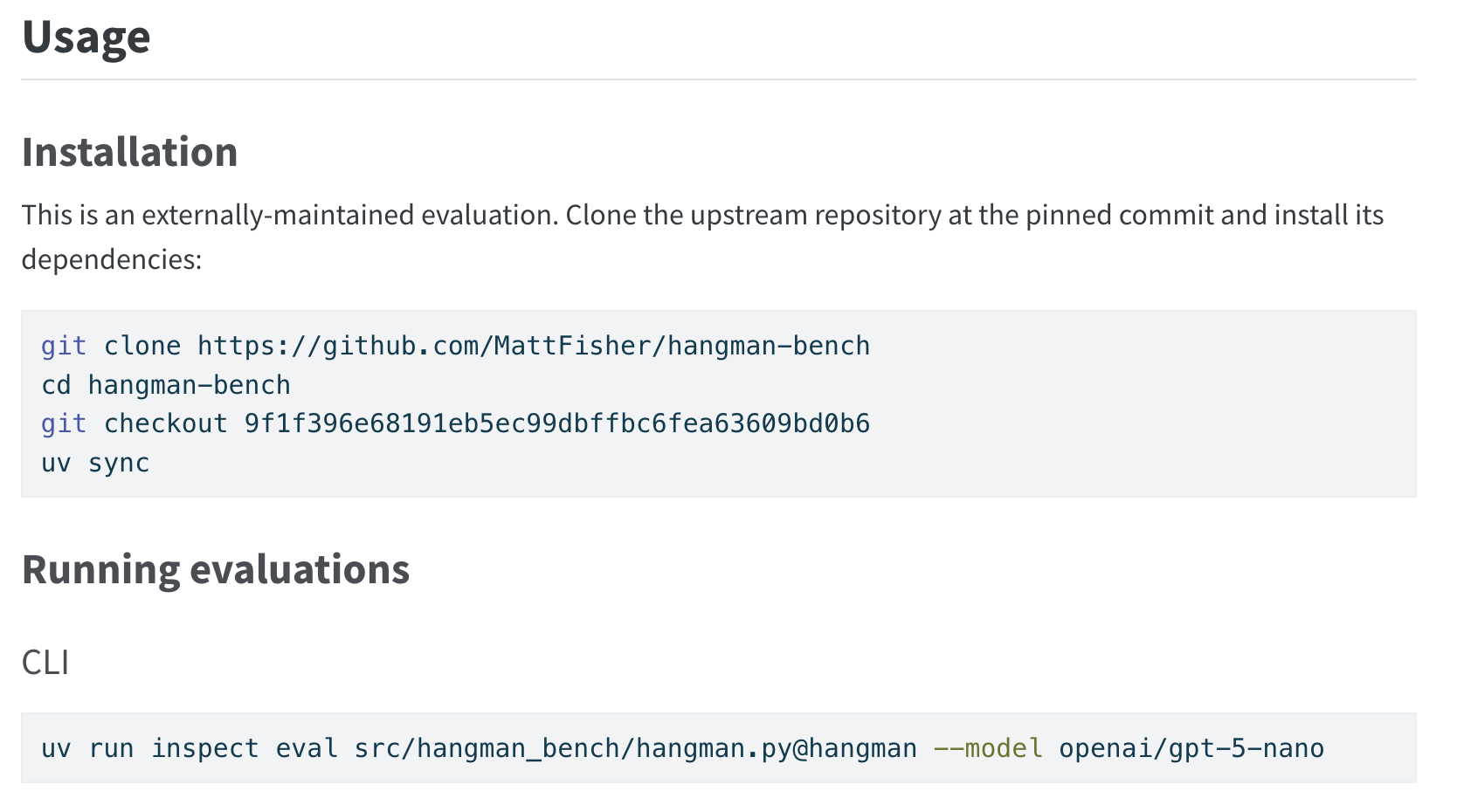
How to add an evaluation to the register
We designed the submission process to be lightweight. However, to plug into Inspect Evals’ docs and workflows, the upstream eval repo must meet the following requirements:
Upstream repo requirements
- Have a (
pyproject.toml) with a[project]table so it can be installed viauv sync(or any PEP 517-compatible installer). We useuvin the generated commands for consistency with the rest ofinspect_evals, but nothing upstream depends on uv specifically.- Here is an example
pyproject.tomlfrom the Generality Labs eval implementation template. - See HangmanBench for a filled out example.
- Here is an example
- Declare
inspect_aias a dependency. - Define each task with the
@taskdecorator frominspect_ai. - External assets are hosted and pinned in stable, version-controlled storage.
Steps to submit
Before registering, please read the Contributor Guide for our general guidelines on what we want from an evaluation, including scoping, validity, scoring, and task versioning. These are not mandatory for registry acceptance, in the same way that we required them for acceptance into Inspect Evals.
Ensure any external assets (datasets, model weights, scoring corpora) your eval uses are hosted somewhere with version-control and pinned as assets. For example, Hugging Face assets should be loaded with an explicit
revision=and GitHub raw URLs should include a commit SHA.Open a Register Eval Submission issue. The form asks for:
- arXiv URL — the paper your eval implements (prefer a versioned URL, e.g.
/abs/1234.5678v1). - Source URL — a GitHub blob URL pointing at the Python file containing your
@task-decorated function, pinned to a specific commit (40-char SHA). Include a#L<n>line anchor if the file contains more than one task. - Maintainers (optional) — GitHub usernames of additional maintainers (the submitter is included automatically).
- arXiv URL — the paper your eval implements (prefer a versioned URL, e.g.
Once you submit the issue, a bot will validate your submission, derive the eval metadata automatically, and open a PR on your behalf. You, and an Inspect Eval maintainer, will receive a comment on the issue with the next steps.
Once your PR is open, upload the log files of two models doing an evaluation run of all the samples to our log store and comment on the PR to confirm. A maintainer will verify them before merge. The runs can use a small, inexpensive model — see Why do I need to upload log files? for what they’re for.
How to update an evaluation in the register
When the upstream eval changes and you want the register to reflect it, pre-approved contributors can follow the steps below. If you are not pre-approved, raise an issue with the register entry and the new upstream commit to request an update.
- Upstream maintainers land their changes in the upstream repo.
- Bump
source.repository_commitin the Inspect Evals Register and re-runuv run python tools/generate_readmes.py --create-missing-readmes. This tells users ofinspect_evalsthat you have vouched for the eval at that particular commit. If the update changes the evaluation’s behaviour, consider regenerating theevaluation_reportto record new results. - Open a PR here. Both you and anyone listed under
source.maintainerswill be pinged before merging.
Automated register submission checks
Whenever a PR is opened (or marked ready for review) that touches register/<name>/eval.yaml, the register-submission workflow runs. PRs that bundle register edits with non-register changes (e.g. schema migrations that touch metadata.py alongside the register entries) are allowed — they go through both this workflow and the standard agentic code review.
The workflow runs in two passes. The lightweight automated checks always run; the heavyweight agentic code review only runs when the diff actually shifts what an entry points at or claims about the upstream code.
Always-run automated checks
| Check | What it confirms |
|---|---|
| Size | At most 10 eval.yaml entries are added in a single PR (beta cap). |
| Repository access | source.repository_url resolves to a public GitHub repo. |
| Commit pinning | source.repository_commit is a full 40-char hex SHA that exists on the remote. |
| Duplicate | The eval id (directory name) doesn’t collide with an existing internal or register eval, and declared task names don’t collide with any existing task. |
Heavy automatic code review (significant changes only)
The agentic code review runs when the diff is register-significant — a new entry, a source.repository_url / source.repository_commit change, a tasks[*] rename or path change, or a title / description edit. Field tweaks like abbreviation, tags, source.maintainers, or evaluation_report updates aren’t significant on their own, so the heavy pass is skipped for them.
| Check | What it confirms |
|---|---|
| Task function | A @task-decorated function with the declared name exists at each task’s task_path in the upstream repo. |
| Runnability | Each task file imports from inspect_ai and constructs a Task with a dataset and scorer. |
| Description accuracy | title and description in eval.yaml reflect what the code actually does. |
| Security | No cryptocurrency mining, credential exfiltration, arbitrary shell execution, or sandbox="local" paired with model-produced code. |
| Fuzzy duplicate | Surfaces existing evals with similar names or titles. Non-blocking — acknowledge in a PR comment if the warning is intentional. |
| Lint | Runs inspect-evals-lint with its register configuration (the single-eval layout, eval.yaml optional) on the pinned upstream commit and posts the per-rule results as a PR comment. Informational — the same checks the lint badges report after merge, shown before it; a clean pass is not required at this stage. |
A failed check posts a comment on the PR. There are two flavours, depending on which check failed:
- Automated checks (size, repository access, commit pinning, duplicate) — the comment names what failed. Push a fix and the workflow re-runs automatically. There’s no override.
- Agentic code review checks (task function, runnability, description accuracy, security) — the comment carries
[REGISTER_BLOCK], or[REGISTER_SECURITY_BLOCK]for security findings. Push a fix and re-run, or a maintainer can post[REGISTER_BLOCK_OVERRIDE]/[REGISTER_SECURITY_OVERRIDE]to waive the block.
If you believe a block was raised in error, comment /appeal to notify maintainers via Slack.
If you need to kick off the workflow manually — e.g. on a draft PR or to retry after an external failure — the PR author or a maintainer can comment /register-submit.
Lint badges
The Register Lint workflow runs daily in inspect-evals-actions. It reads the register and checks each upstream repository at its pinned source.repository_commit using inspect-evals-lint. Nothing from the upstream repository is installed or executed. Changes to registrations appear after the next daily run; maintainers can also trigger a run manually. Results are published on the operations repository’s register-lint branch.
The documentation table loads these results in the browser. It shows results as out of date when the repository, pinned commit or task paths differ from the documentation’s registration, or when the check is more than seven days old. Missing results and service failures are displayed separately.
Upstream maintainers can show the result in their own README with a shields.io badge, replacing <id> with the register entry’s directory name:
Per-section badges are available by swapping lint.json for file_structure.json, code_quality.json, tests.json, best_practices.json or security.json. The badge reads passing/applicable: warnings count as passing, checks suppressed with # inspect-evals-lint: ignore[...] comments or per-file-ignores do not, and skipped checks are not applicable. Full per-check results are in results/<id>.json on the same branch. Badges describe the last collected registered commit. They are informational and never block a submission or an update. The checks are documented in the linter’s rule index; to improve a score, run uvx inspect-evals-lint --preset single-eval --all locally in the upstream repo (the register entry holds the metadata, so an eval.yaml finding there does not apply).
The linter checks one Python package per task, so an eval whose task_path is a bare module (no __init__.py beside it) is reported as layout unsupported rather than scored.
FAQ
Why is submission limited to one task (eval) per issue?
Each issue maps to one eval/task in the register to keep things straightforward. If your repo contains multiple tasks, submit a separate issue for each one.
Why is an arXiv URL required?
The bot uses the arXiv paper to automatically derive eval metadata (title, description, tags, etc.) so that you don’t have to write it by hand. The paper may be the one that originally introduced the benchmark, or a separate paper describing the replication.
This is a quality control requirement that ensures that the methodology behind the eval’s design and implementation is publicly available. Researchers or users who want to understand, use, or build on your evaluation require access to the methodology to practice good science.
Why do I need to upload log files?
Log files of full eval runs testing two different models accompany each external register listing. We have added this requirement in as part of our quality control process because:
- They show your eval implementation runs end-to-end
- It documents the attempt to replicate the associated paper,
- They can plug into our scanners that we have designed to pick up common issues with eval implementations.
They also build the Inspect Evals log library we are working towards releasing (details to come!), which contributes back to open science ML research.
These logs may be made public, as a result you should consider post-processing to de-identifying them (i.e removing paths with usernames or other PII). The issue of privacy as well as other sensitivities to do with releasing log files (for example, log files from gated datasets or sensitive evals) is something we are actively tracking, but please reach out if you have any questions.
We don’t want this to be a barrier so feel free to run with any small/ cheap model (which you should be doing anyways as part of your eval implementation!). If you have any questions or need assistance, please reach out to one of the maintainers.
What if the standard issue workflow doesn’t work for me?
If you need more control over the eval.yaml fields or you need to customise metadata that the bot doesn’t handle, note this in your submission issue and a maintainer will handle it. The maintainer will make the manual changes and open the PR on your behalf.
If you manually open a register submission it is likey to be missed. Please use the opened issue to track the submission.
Other contributions
For other types of changes, please see the contribution guide. In particular, if you want to suggest a change to the submission process, the automated checks, or the functionality of the Inspect Evals docs itself, please open an issue.