Skewed Score Analysis
Overview
These examples demonstrate how to analyse ordinal evaluation data with skewed distributions using ordered logistic regression models. Located in examples/skewed_score/, they showcase custom model implementations and specialised visualisations for ordinal outcomes.
This notebook implements methods from the paper: Skewed Score: A Statistical Framework to Assess Autograders
We cannot provide the inspect logs for this example, just the extracted csvs.
Question 1: Grader Effects Analysis
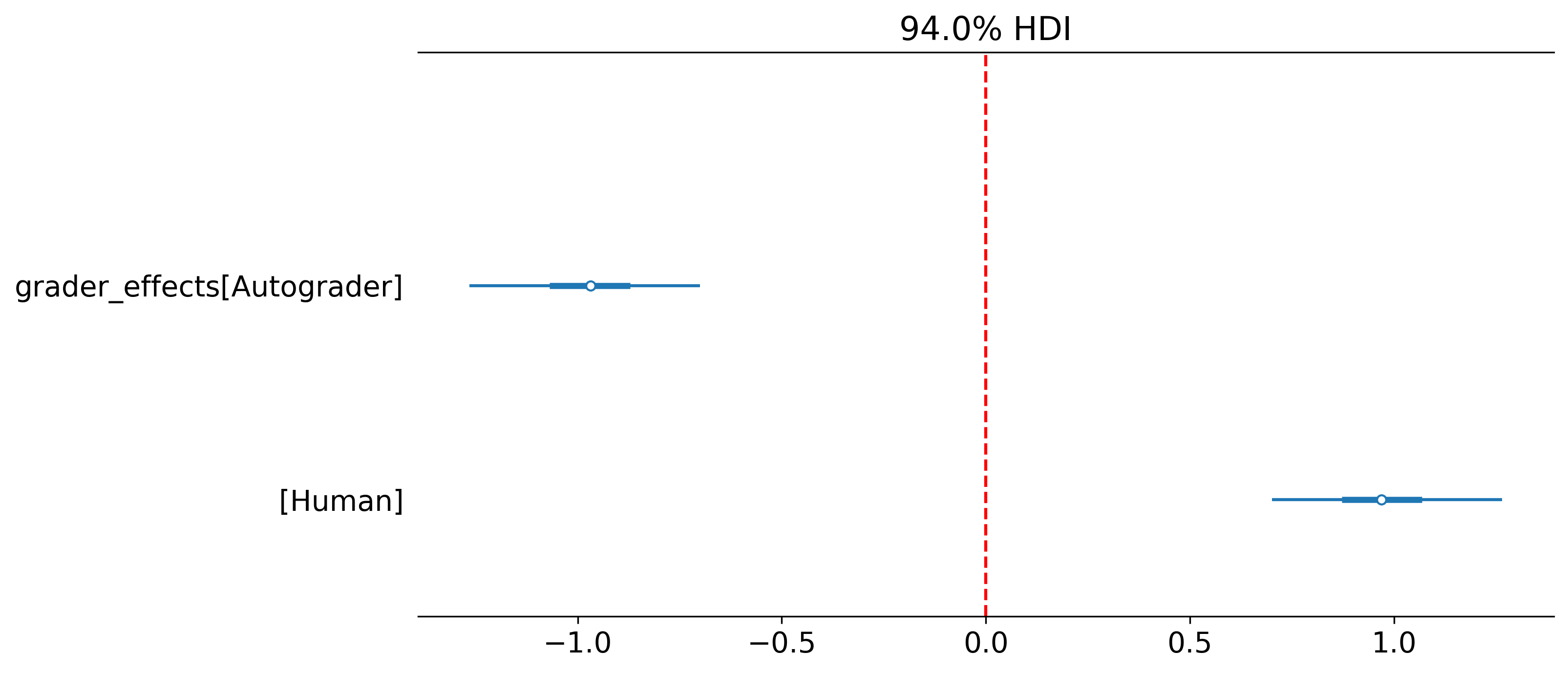
Analyses how different graders affect score distributions on a 0-10 rating scale.
Purpose
- Estimate grader-specific effects
- Account for ordinal score structure
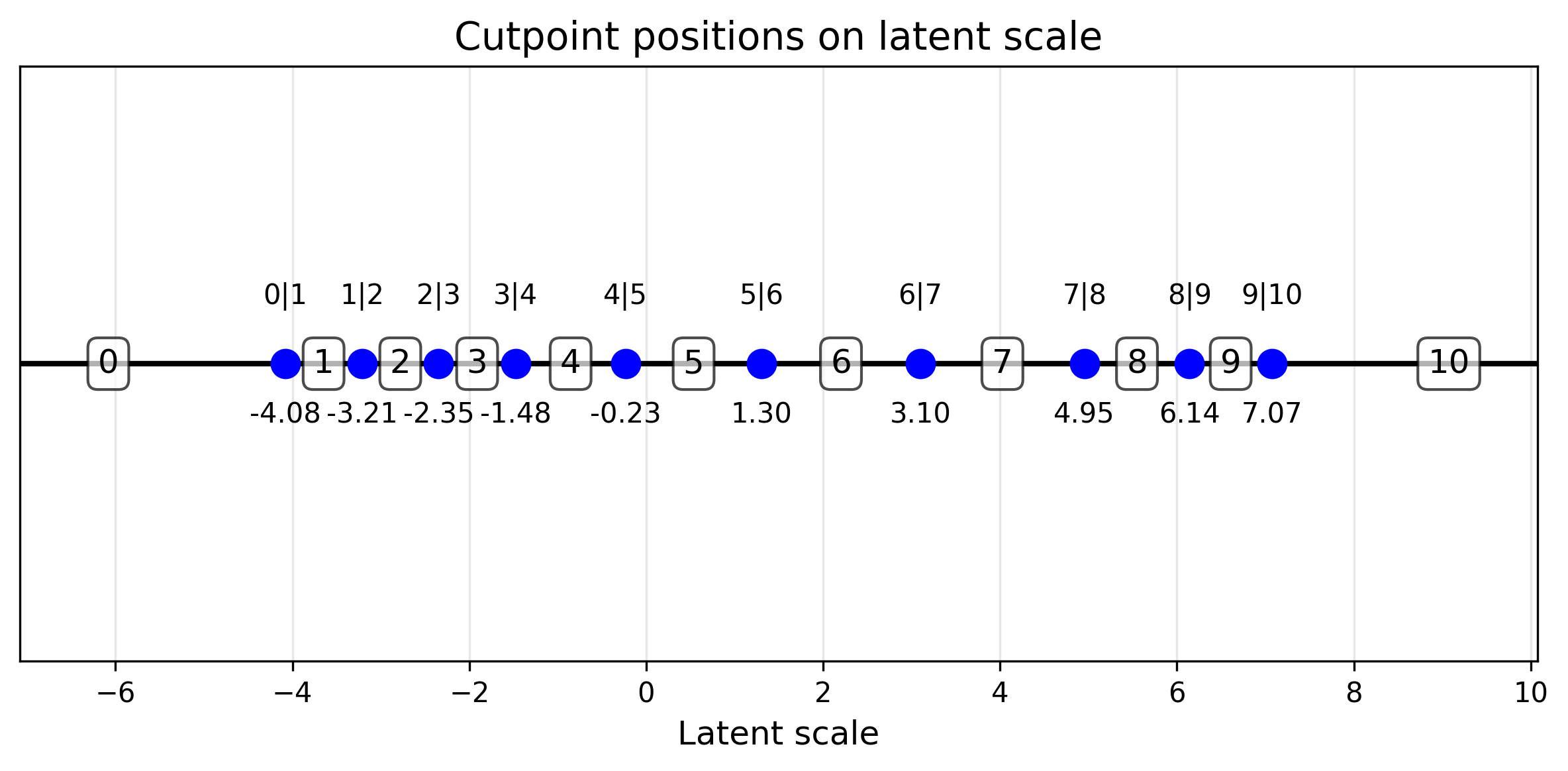
- Visualise cutpoint distributions
Configuration
- 1
- Here we use effect coding where parameters sum to zero, this make interpretation of the values easier.
Model Implementation
As each item awarded a score between 0 and 10, need need to use a special likelihood function. Good news HiBayES already supports this with the ordered_logistic_model model.
- 1
- along with the cutpoints (see below) and the global intercept we add the grader parameter to see how different graders (a human and an LLM) score.
Visualisations
A mixture of custom and default communicators are used to interpret the data
- 1
- Specify the file which contains your custom communicators.
Question 2: Do autograders favour their own generation?
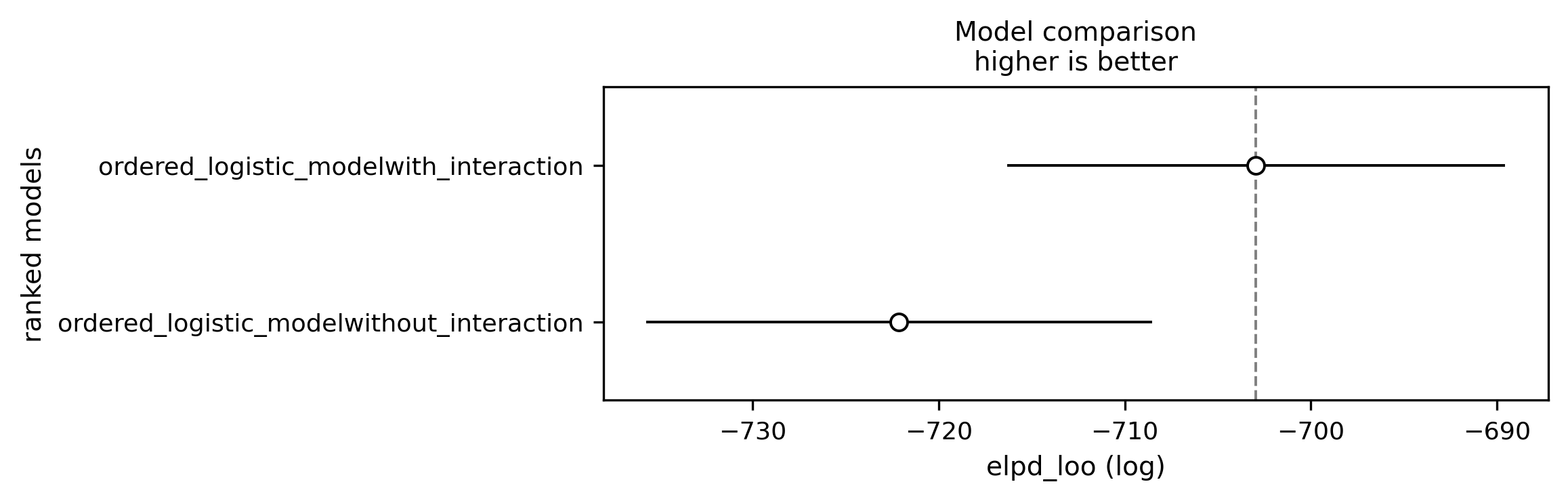
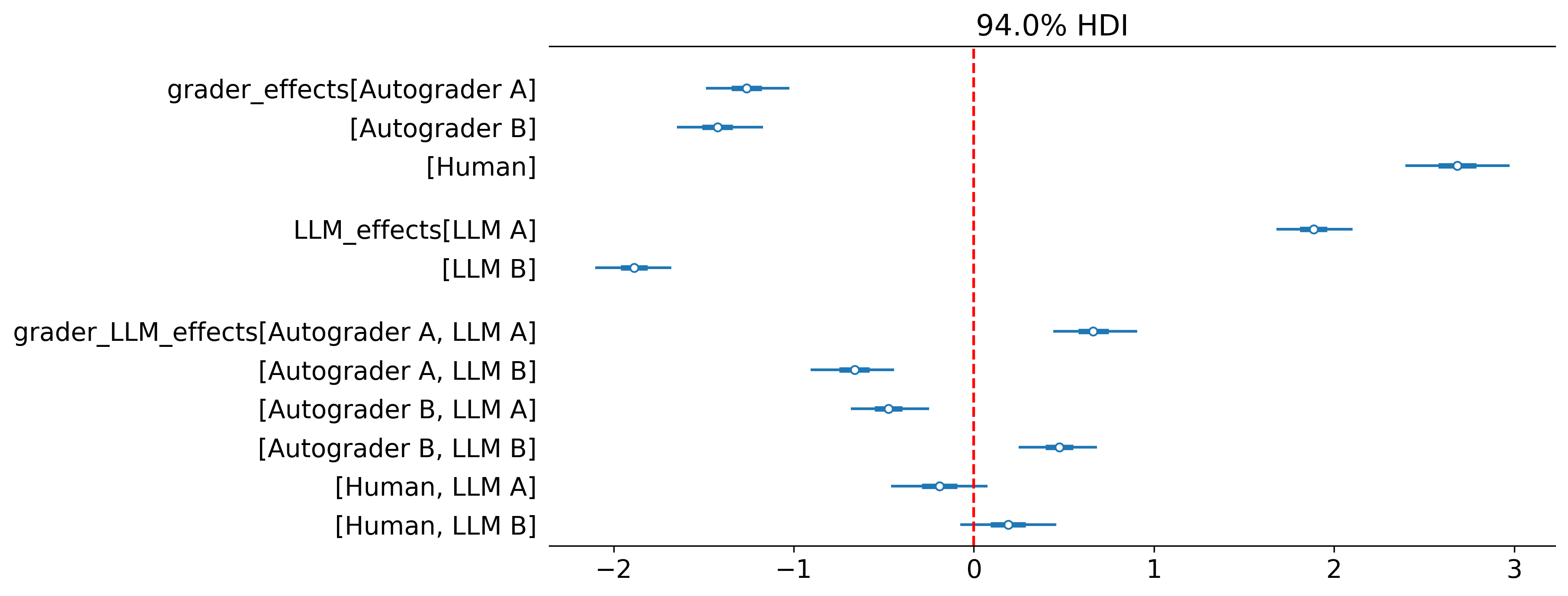
To do this we can add an interaction term to see if autograders favour their own generation.
model:
models:
- name: ordered_logistic_model
config:
tag: with_interaction
main_effects: ["grader", "LLM"]
interactions: [["grader", "LLM"]]
num_classes: 11 # for 0-10 scale
effect_coding_for_main_effects: true
- name: ordered_logistic_model
config:
tag: without_interaction
main_effects: ["grader", "LLM"]
num_classes: 11
effect_coding_for_main_effects: true
check:
checkers:
- prior_predictive_plot: {interactive: false}
- divergences
- r_hat
- ess_bulk
- ess_tail
- posterior_predictive_plot: {interactive: false}
- waic- 1
- Here is where we add the interaction!
- 2
- It is still important to assess the fit of a model without an interaction. Maybe it is a better fit and you will find no evidence to suggest autograders favour their own generations.
- 3
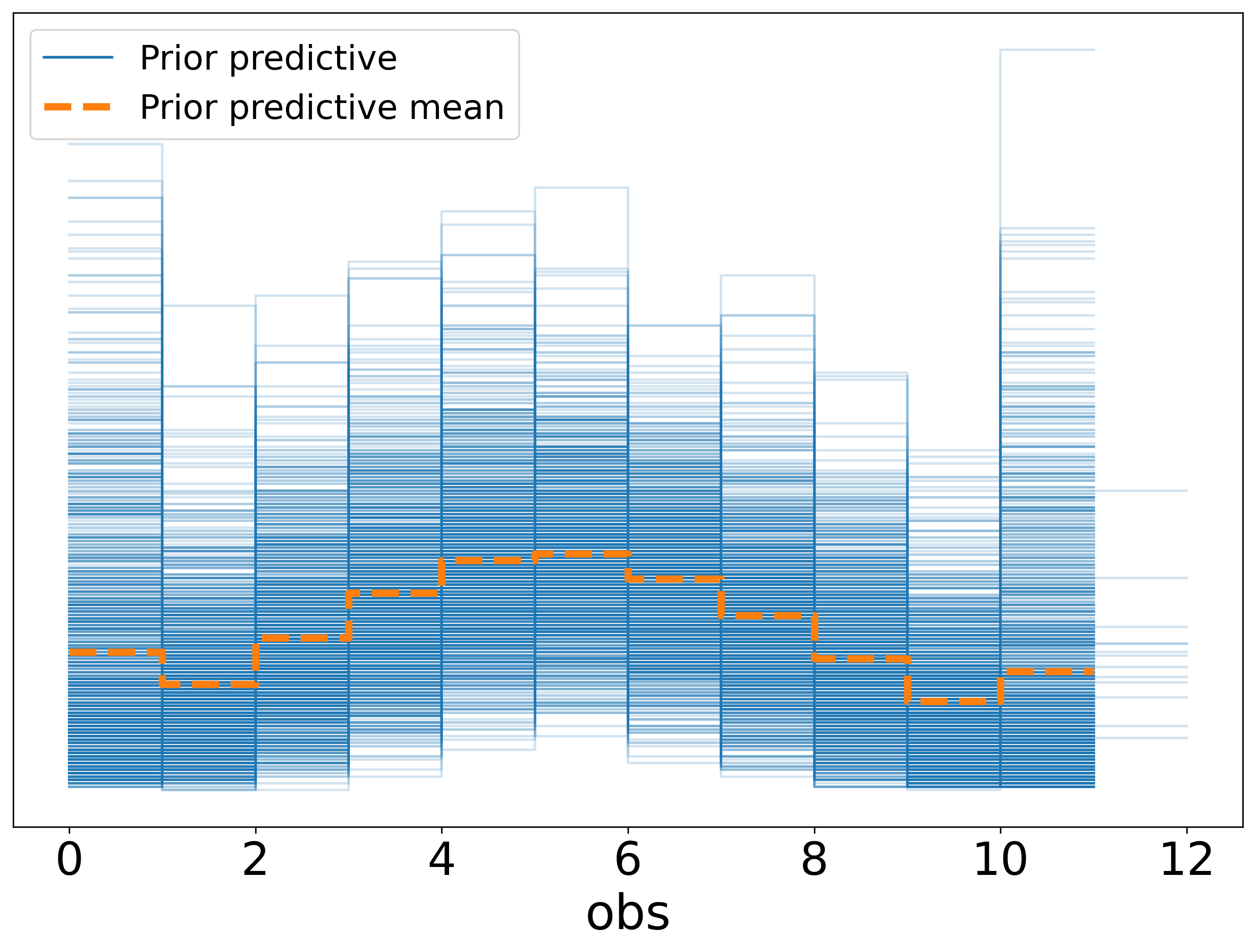
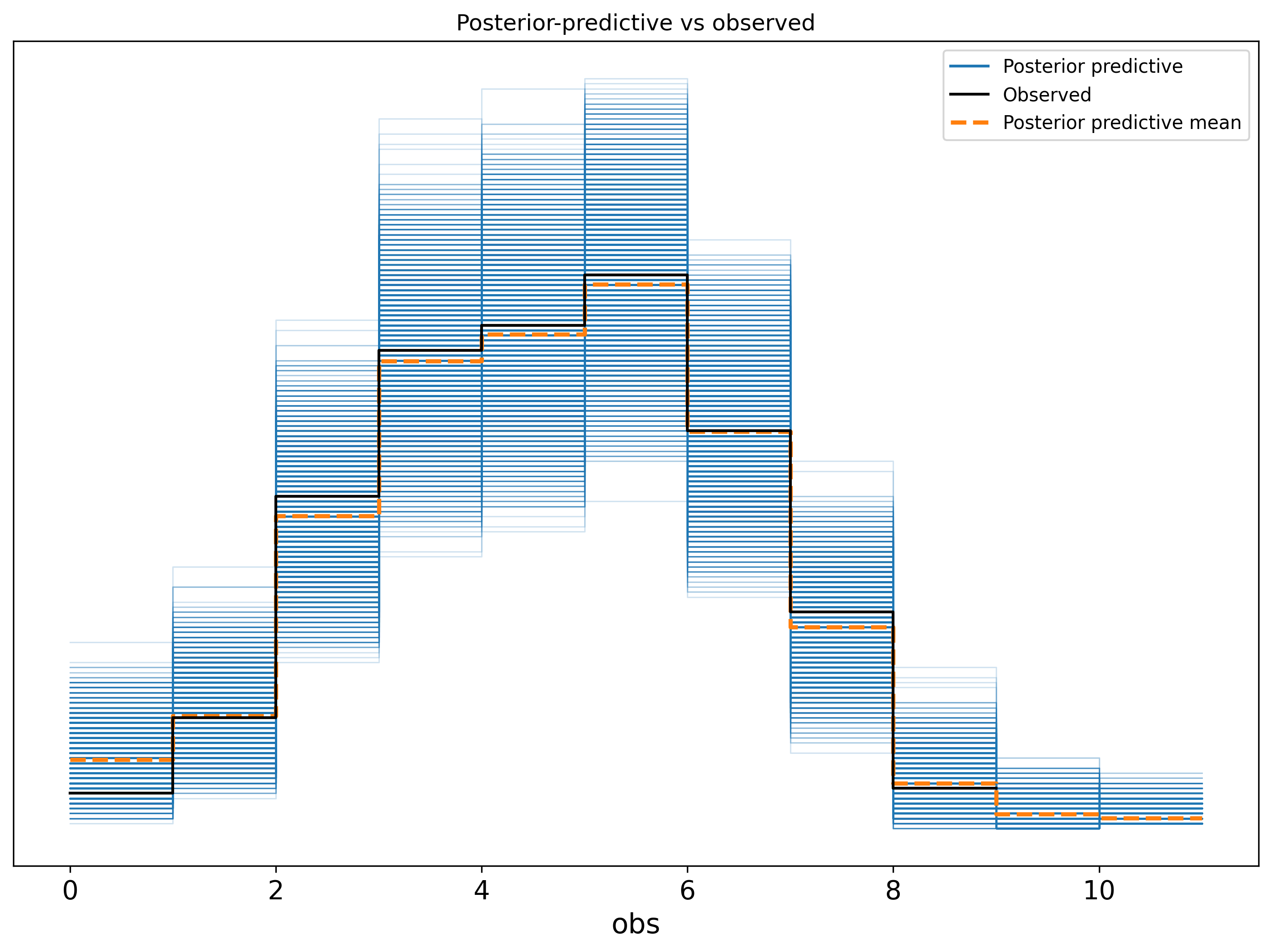
- we are showing the checker config here as when there are lots of models to fit having to online approve the prior and posterior predictive checks can become quite buredomsome. Here we have turned off the interactive element and you can review the checks offline. See the plots below.
For the comparison the model_comparison_plot was added to the communicators.
Question 3: Do autograders differ systematically from human experts?
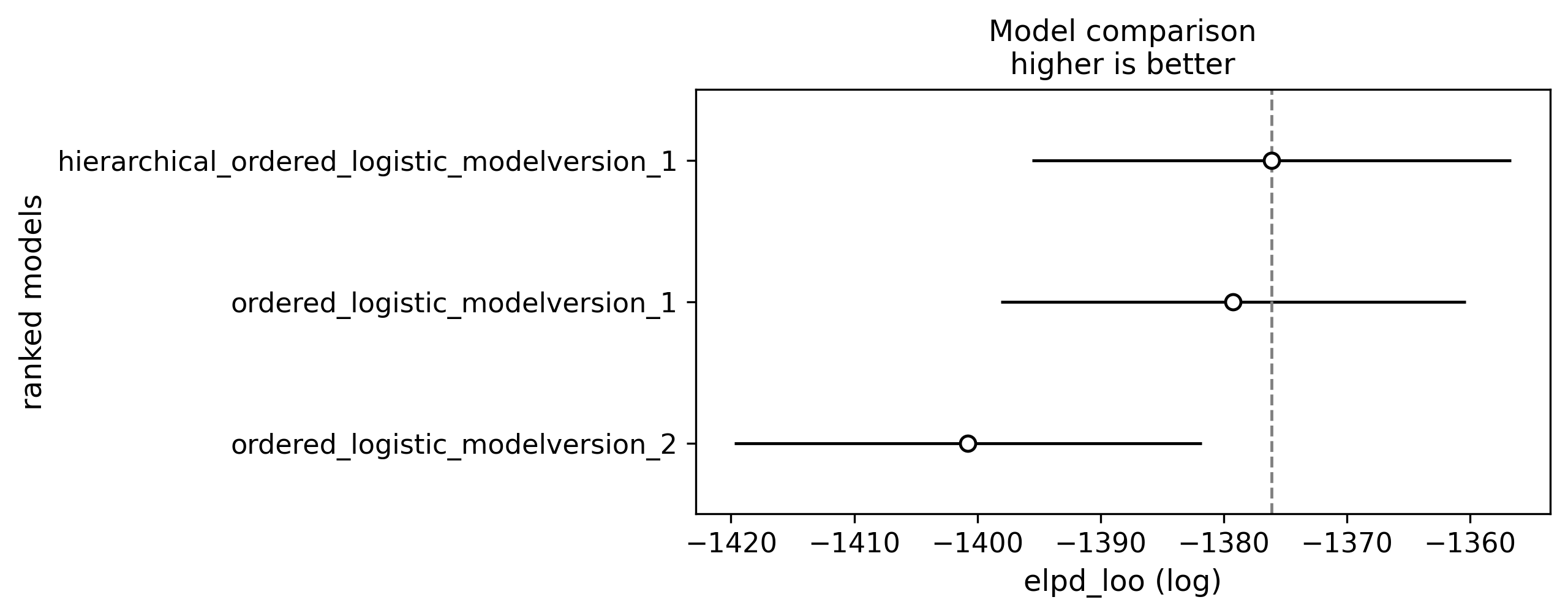
To answer this question we can group the graders into human and LLM and utilise a hierarchicl GLM to reprent the group level effects (see the paper for a detailed explanation).
To achieve this we create a new variable which details the variable type using a custom processor.
data_process:
path: ../custom_processors.py
processors:
- add_categorical_column: {new_column: grader_type, source_column: grader, mapping_rules: {Human: human}, default_value: model}
- extract_observed_feature: {feature_name: score} # 0-10 rating
- extract_features: {categorical_features: [grader, grader_type, LLM], effect_coding_for_main_effects: true, interactions: true}- 1
- specify the file where the custom processor is defined.
- 2
- Calling the custom processor defined below.
@process
def add_categorical_column(
    new_column: str,
    source_column: str,
    mapping_rules: Dict[str, str],
    default_value: str = "unknown",
    case_sensitive: bool = False,
) -> DataProcessor:
    """
    Add a new categorical column to the processed data based on mapping rules (does the value contain the pattern).
    """

    def processor(
        state: AnalysisState, display: ModellingDisplay | None = None
    ) -> AnalysisState:
        def categorize(value):
            str_value = str(value)
            if not case_sensitive:
                str_value = str_value.lower()

            for pattern, category in mapping_rules.items():
                search_pattern = pattern if case_sensitive else pattern.lower()
                if search_pattern in str_value:
                    return category
            return default_value

        state.processed_data[new_column] = state.processed_data[source_column].apply(
            categorize
        )
        return state

    return processor
Check out how we defined a custom hierarchical model where grader effects inherit a group effect e.g. Human A inherits from the Human parameter in examples/skewed_score/custom_model.py.
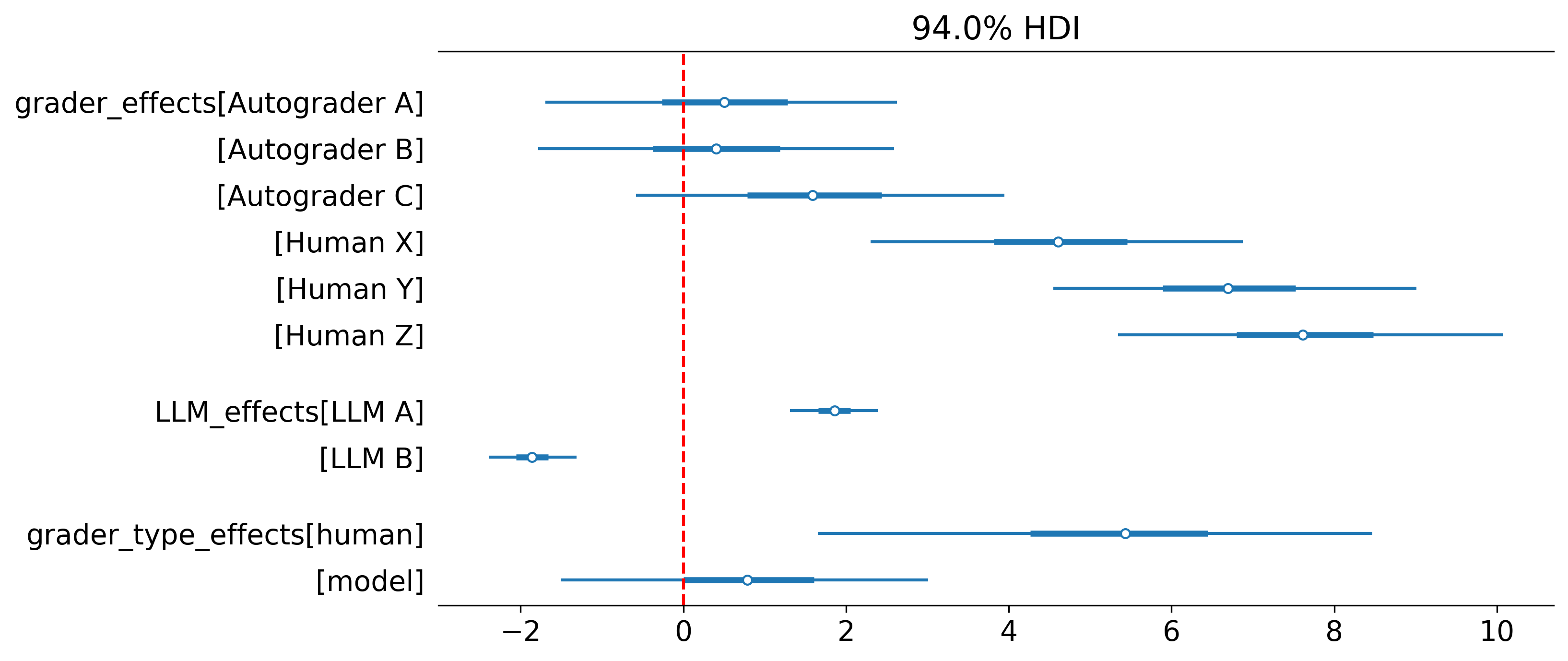
Question 4: How do scores differ at an item level?
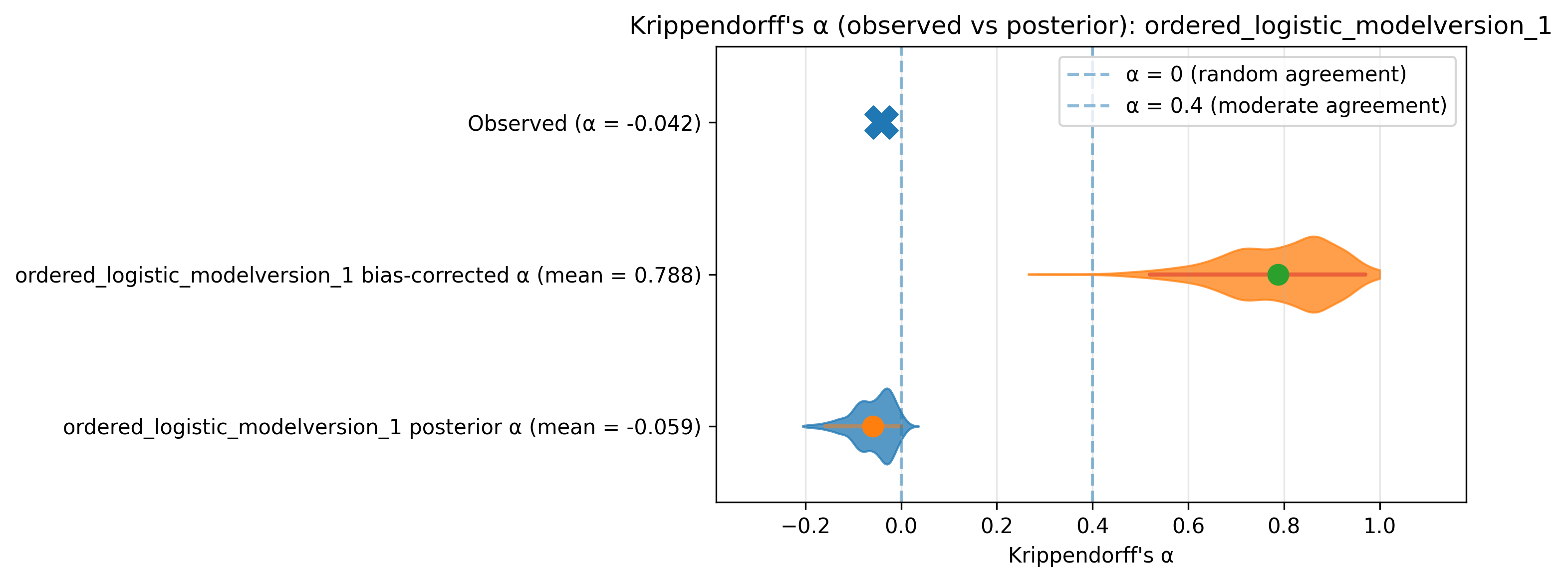
To what extent do graders agree with one another? We can calculate Krippendorff’s alpha over simulated scores by sampling from the fitted GLM. This sounds quite complicated but can be easily implemented as a communicator!
@communicate
def krippendorff_alpha(
*,
max_draws_per_model: int = 1000,
ci_level: float = 0.95,
figsize: tuple[int, int] = (10, 4),
title_prefix: str = "Krippendorff's α (observed vs posterior): ",
) -> Communicator:
"""
Compute observed α and per-model posterior α distributions, and plot a separate
figure for each model.
"""
def communicate(
state: AnalysisState,
display: ModellingDisplay | None = None,
) -> Tuple[AnalysisState, CommunicateResult]:
# Observed / "classical" α from raw data (shared across figs)
classical_alpha = compute_krippendorff(state.processed_data)
for model_analysis in state.models:
if not model_analysis.is_fitted:
continue
if not model_analysis.inference_data.get("posterior_predictive"):
if display:
display.logger.warning(
f"No posterior predictive samples for model {model_analysis.model_name} - skipping Krippendorff's alpha for this model. "
"If you want this, run with posterior predictive sampling enabled."
)
continue
# get alpha from posterior draws
pred = (
model_analysis.inference_data.posterior_predictive.obs.values
) # (chain, draw, N) <1>
draws_flat = pred.reshape(-1, pred.shape[-1]) # (chain*draw, N)
# Subsample draws for speed/reasonable CI
rng = np.random.default_rng(0)
take = min(max_draws_per_model, draws_flat.shape[0])
idx = rng.choice(draws_flat.shape[0], size=take, replace=False)
alphas = []
for i in idx:
df_i = state.processed_data[["grader", "item"]].copy()
df_i["score_pred"] = draws_flat[i]
a = compute_krippendorff(df_i, values_col="score_pred")
if np.isfinite(a):
alphas.append(float(a))
alphas = np.asarray(alphas, dtype=float)
# counterfactual calculation omitted for brevity.
return state, "pass"
return communicate- 2
- Calculate alpha for each one of these draws. You can report the distribution of these alphas.
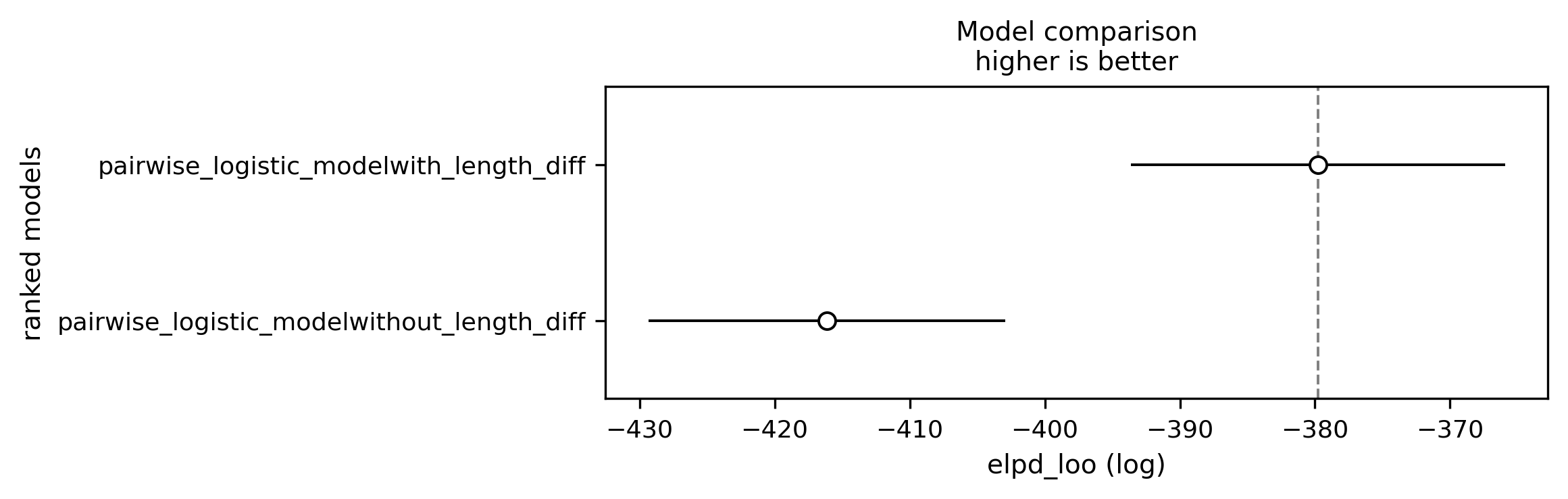
Question 5: Do autograders favour longer outputs?
Until now we have focussed on categorical effects. GLMs of course can support continous parameters, often referred to as slopes. Here we add a slope investigating whether the length of response systematically affects LLM grader scores.
data_process:
  processors:
    - extract_observed_feature: {feature_name: first_is_chosen} # binary outcome
    - extract_features: {categorical_features: ['llm_pair', 'grader'], effect_coding_for_main_effects: true, interactions: true, continuous_features: [length_diff], standardise: true}

model:
  path: ../custom_model.py
  models:
    - name: pairwise_logistic_model
      config:
        tag: with_length_diff
        main_effects: ['llm_pair', 'grader', 'length_diff']
        effect_coding_for_main_effects: true
    - name: pairwise_logistic_model
      config:
        tag: without_length_diff
        main_effects: ['llm_pair', 'grader']
        effect_coding_for_main_effects: true