Checkers
It is important to check that your assumptions about the data story along with your modelling decisions are good ones. Also, to check if there are any errors in the fitting process. Checkers in hibayes achieve this. There are a number of built in default checkers that you can select from:
What makes up a checker?
Checkers work on each model independently, and so require a ModelAnalysisState and have an optional argument for the display. They return the ModelAnalysisState with the CheckerResult (pass, fail, error or NA).
from hibayes.check import Checker, CheckerResult, checker
@checker(when="after")
def my_checker(
chances: float = 0.42,
) -> Checker:
"""
a checker which fails with a chances probability
"""
def check(state, display):
rng = random.uniform(0,1)
inference_data = state.inference_data
state.add_diagnostic("rng", rng)
return state, "pass" if rng > chances else "fail"
return check- 1
- does this check run before or after the model has been fitted? The checker decorator registers the function so it can be accessed simply by calling the checker string but it also enforces an agreed upon functionality.
- 2
- any args you might want the user to pass through the config.
- 3
- you can access anything in the ModelAnalysisState
How to interpret results
If you are using the hibayes display CheckerResults are displayed live in the Checker Result tab with an F, green dot, yellow E and grey dot representing a fail, pass, error, NA respectively.
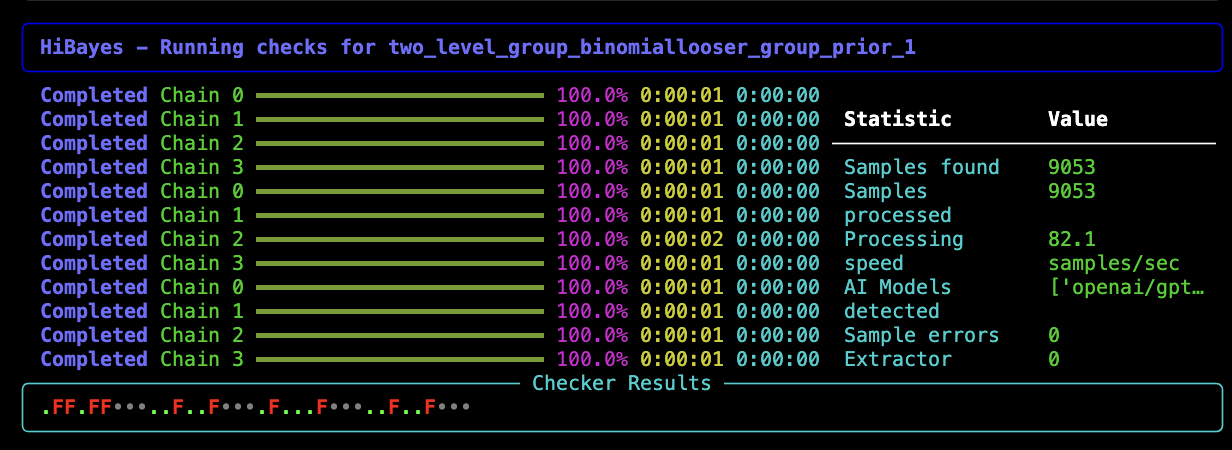
You can also inspect the model directory in the AnalysisState for each model. Here diagnostic plots are saved and diagnostic summaries are stored in diagnostics.json
Built-in Checkers
Before Fitting
| Checker | Purpose | Parameters | Result |
|---|---|---|---|
prior_predictive_check |
Generates prior predictive samples and stores them in inference data | num_samples=1000 |
NA (inspect visually) |
prior_predictive_plot |
Plots prior predictive distribution for visual assessment | variables=None, kind='kde', figsize=(12,8), interactive=True |
pass/fail (user approval) |
After Fitting
| Checker | Purpose | Parameters | Result |
|---|---|---|---|
r_hat |
Checks R-hat convergence diagnostic | threshold=1.01 |
pass if all R-hat < threshold |
ess_bulk |
Checks bulk effective sample size for mean estimation | threshold=1000 |
pass if all ESS > threshold |
ess_tail |
Checks tail effective sample size for quantile estimation | threshold=1000 |
pass if all ESS > threshold |
divergences |
Checks for divergent transitions in HMC sampling | threshold=0 |
pass if count ≤ threshold |
bfmi |
Checks Bayesian Fraction of Missing Information | threshold=0.20 |
pass if all chains ≥ threshold |
loo |
Leave-One-Out cross-validation (PSIS-LOO) | reff_threshold=0.7, scale='log' |
pass if all Pareto k < threshold |
waic |
Computes Widely Applicable Information Criterion | scale='log' |
NA (informational) |
posterior_predictive_plot |
Compares observed data to posterior predictions | num_samples=500, kind='kde', interactive=True |
pass/fail (user approval) |
You can customise which checkers run and their parameters in your config file.